Integration with BuiltGrid


Fast and accurate estimates become profitable projects
The most affordable team-based estimating app now integrates with the largest network of trades and suppliers to get accurate estimates, cut costs, and drive greater supplier engagement for your project delivery.

Take off
Pricing
Take off
Profit
Estimate Smarter, Cut Costs & Engage Suppliers

Quote it up. Win the job
Create detailed, professional quotes for your clients with a few simple clicks. With options to customise to your business, Dindo will help you give your clients the information they need, in a professional style that maintains your image.
Working better together
Want to have more than one person working in a job at one time? No problem! With Dindo you’ll connect with your team like never before, using real-time collaboration and multi-user functionality.
Work less. Live more
With features and functionality to help improve your estimating, Dindo gives you the power to get the job finished faster, so you can focus on the more important things in life.
Integrated scope - shared for accurate pricing
1-click automated scope, quotes, orders and schedule. Get back control and visibility you need to manage your construction projects to make quote and order management easy and reduce project costs by 9%.
Build your profits. Save weeks of admin on every project
Simplified construction processes reduce your project admin and increase your profits, whether you’re using BuiltGrid directly or in your favourite builder app.
Connect and work smarter with your tades and suppliers
Connect closed business systems so that you can work smarter with your trades and suppliers from one common platform.

How the integration works
There’s no double handling when your Dindo and BuiltGrid accounts are connected. You can create your estimate and request quotes from the BuiltGrid network in the Dindo app. Quote comparisons are linked from Dindo so you can view quotes side-by-side and complete the process by ordering in BuiltGrid and lock in signed contracts with trades and suppliers.
Connect

Go to the Dindo settings page and make the seamless connection between Dindo and BuiltGrid. This will allow you to synchronise job details, documents and trade scope without the double handling.
Add To Job
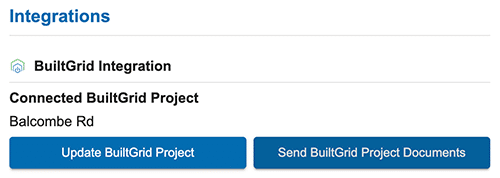
Open your job details page and add connect BuiltGrid in the integrations section. This activates the request for quote function in the trades page when doing estimates for this job. ‘Update BuiltGrid Project‘ is important when you change key information like address or status. ‘Send BuiltGrid Project Documents‘ will share the latest project documents which helps your suppliers quote more accurately or have the latest info on site.
Add Request For Quote (RFQ)

After you have completed your take-off for a trade and have added all trade items, select the BuiltGrid logo icon to start the request for quote from the BuiltGrid supplier network.
Create Request For Quote (RFQ)

Add a required date, any of your supplier(s) contacts that can do the work and select ‘Next’.
Add Job Types & Send RFQ

Get the best responses from thousands of trades and suppliers in the BuiltGrid network by selecting one or more jobs that appear in this job list that most closely match your quote request. Then select ‘Send to BuiltGrid’.
Quote Comparison

Trades and suppliers will respond with quotes and this will be indicated in the left hand menu of the Dindo trades page. Simply click to select the trade in the left hand menu you wish to see quotes and select the BuiltGrid logo you originally used to create the request for quote. A quote comparison will open like the above showing supplier submissions side-by-side with links to shared documents.
Order & Contract

Orders are placed in the BuiltGrid straight from the quote comparison page. All you need to do is select how you will be paying and the esitmated schedule date for the work to be done. You can move accordingly closer to the date within the supplier’s lead times window. Trades and suppliers sign the order online which generates a contract for you and the suppliers that includes the original scope, quote, payment terms and schedule. Both parties have a clear understanding of the work to be conducted so there will be less disputes and timely payments.